
Zapier and Make: connect Inspiremail with webhooks
Connect Zapier and Make to Inspiremail without a plugin: catch email events with a webhook trigger, add contacts with an HTTP action and a scoped API key.
· 5 min read · By Reda El Kasraoui
TL;DR: there's no Inspiremail app in the Zapier or Make directories, and you don't need one. For triggers, create a webhook URL in Zapier (Webhooks by Zapier › Catch Hook) or Make (Webhooks › Custom webhook) and add it as an endpoint in Settings › Webhooks with the events you want. For actions, create an API key with only the scopes the automation needs and call the Inspiremail API with an HTTP step, for example POST /v1/lists/{id}/contacts to add a subscriber.
Zapier and Make are no-code automation platforms: a trigger in one app starts a chain of actions in others. A REST hook is a webhook subscription that an integration creates and removes through an API, instead of someone pasting a URL by hand.
An HTTP action is the generic step both platforms offer to call any API with a method, URL, headers and a JSON body.
| You want to… | Use | Inspiremail side | Key scope |
|---|---|---|---|
| React to an email event | Webhook trigger (Catch Hook / Custom webhook) | Settings › Webhooks endpoint | none |
| Let an integration manage its own trigger | REST hook | POST / DELETE /v1/hooks | hooks:write |
| Add subscribers | HTTP action | POST /v1/lists/{id}/contacts | contacts:write |
| Check events on a schedule | HTTP action + schedule | GET /v1/events | events:read |
Typical uses: send new webinar registrants from a form tool into a list, post a message to the sales channel when a lead clicks, or add a row to a sheet for every hard bounce.
Triggers: events into Zapier or Make
- In Zapier, start a Zap with Webhooks by Zapier › Catch Hook and copy the URL. In Make, add a Webhooks › Custom webhook module and copy its address.
- In Inspiremail, open Settings › Webhooks › Add endpoint and paste the URL.
- Tick only the events the automation uses, for example Clicked for a sales alert, or Bounced and Complained for a CRM cleanup.
- Click Test ping so Zapier or Make records a first request. For field mapping, let one real event arrive (a small test drop to your own address is enough), since a ping only proves the connection.
- Map the fields in the next steps: the body has
id,type,created_atand adataobject with the event's details.
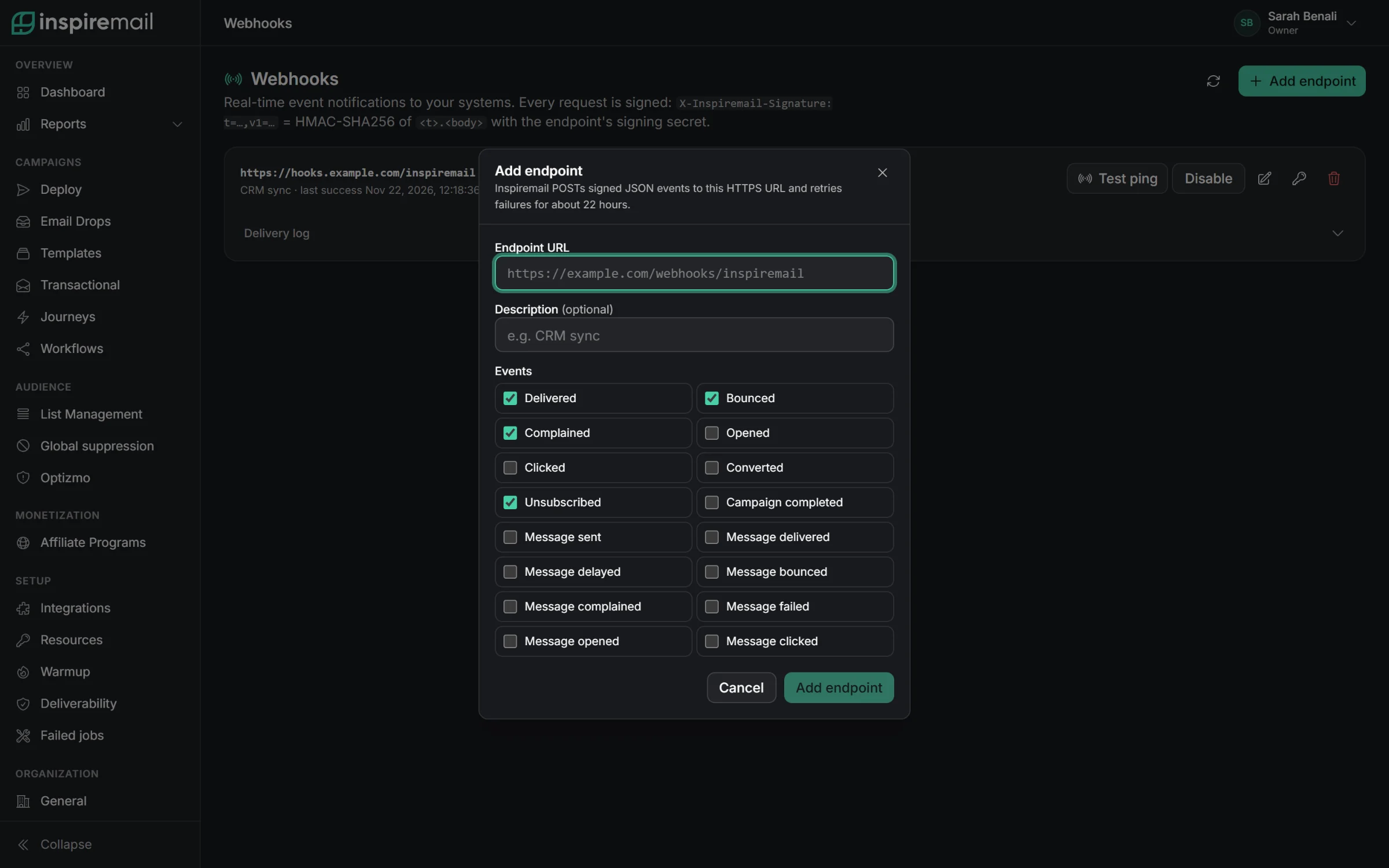
The same endpoint form you'd use for your own server works for a Zapier or Make webhook URL.
Zapier's guide to triggering Zaps from webhooks and Make's webhooks documentation cover their side. Retries, signatures and auto-disable work exactly as for any endpoint; the webhooks guide explains them, and HMAC itself is defined in RFC 2104. Requests are signed, so if the automation does something sensitive, verify the X-Inspiremail-Signature header in a code step first.
REST hooks for builders
If you build a reusable integration (for example a private Zapier app for your agency), let it manage its own subscription: POST /v1/hooks with { "target_url": "…", "event": "clicked" } when the automation is switched on, and DELETE /v1/hooks/{id} when it's switched off. The key needs hooks:write. The response includes the signing secret once. An organization can have up to 100 REST hooks, they show in Settings › Webhooks marked REST hook, and revoking the API key disables the hooks it created.
Actions: Zapier or Make calling Inspiremail
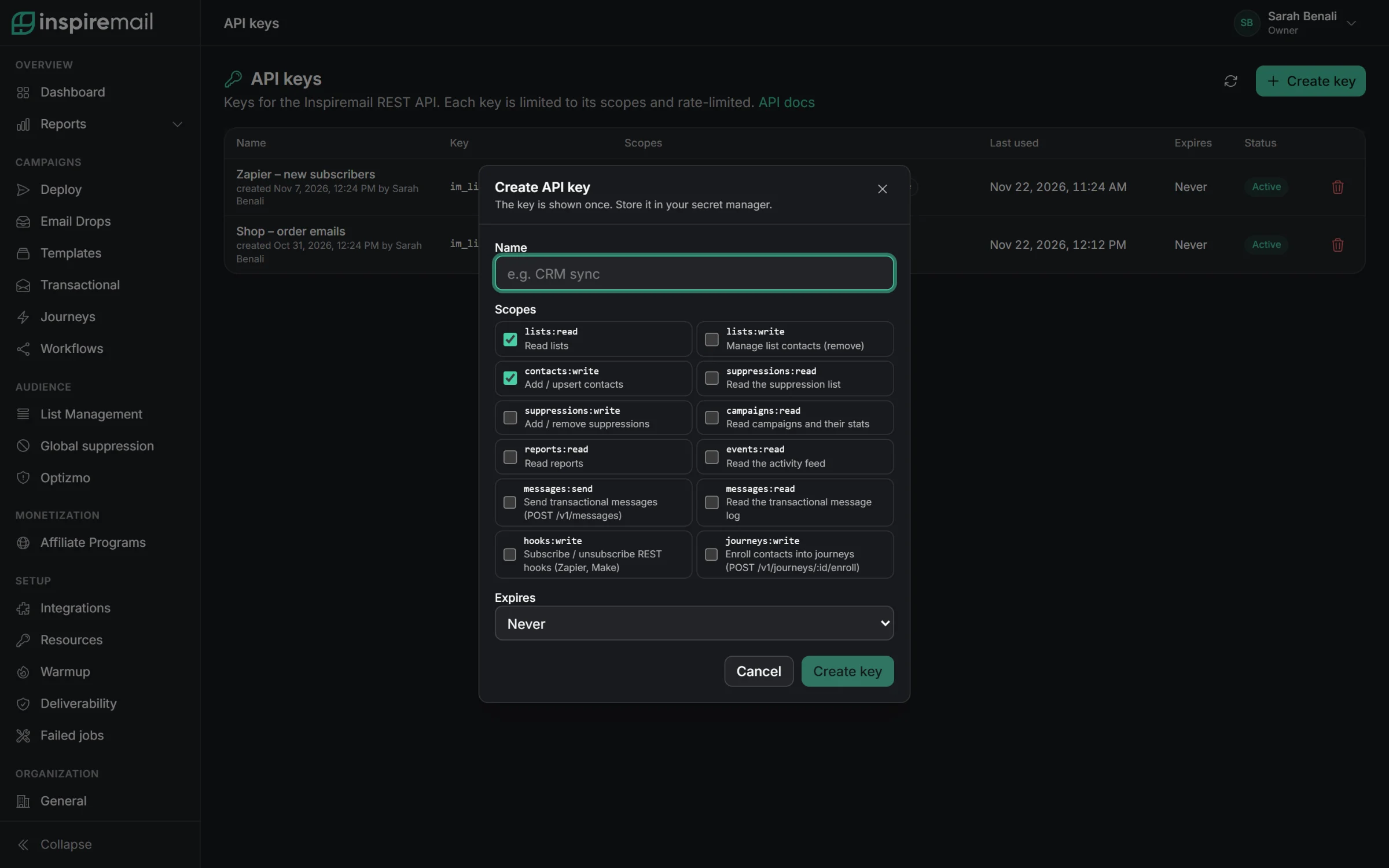
Create a separate key for each automation, with only the scopes it uses.
- In Settings › API keys, click Create key, name it after the automation ("Zapier – webinar sign-ups") and tick contacts:write (plus lists:read if you need to look up list IDs). Copy the key.
- In Zapier add Webhooks by Zapier › Custom Request (Zapier documents it in sending webhooks in Zaps; Webhooks by Zapier needs a paid Zapier plan). In Make add HTTP › Make a request.
- Method
POST, URLhttps://platform.inspiremail.io/v1/lists/{list id}/contacts. - Headers:
Authorization: Bearer im_live_…andContent-Type: application/json. - Body:
{ "contacts": [{ "email": "…", "first_name": "…", "fields": { "webinar": "March" } }], "skip_role_addresses": true }. - Run it once and check the response:
imported,duplicates,invalid,role_skippedandin_other_listtell you what happened.
The same rules as an import apply: addresses are validated and de-duplicated, an address that belongs to another list stays there, and existing contacts are never modified. Only add people who agreed to hear from you; the double opt-in signup form is the better route when you control the form.
Two worked examples
Sales alert on a click. Zapier: Catch Hook (endpoint subscribed to Clicked only) → Filter (only when data contains the offer you care about) → Slack message to the sales channel with the recipient and the link. The Zap only sees clicks, so it stays within Zapier's task limits even on a big drop.
Webinar registrants into a list. Make: the webinar tool's "new registrant" trigger → HTTP › Make a request to POST /v1/lists/{id}/contacts with the key "Make – webinar sign-ups" (scope contacts:write only) → a router that logs invalid and in_other_list results to a sheet so someone can look at them. If you need proof of consent for these people, a Google Sheets import with a consent text, or a signup form, records it for you.
Polling instead of webhooks
Some automations prefer to ask. GET /v1/events?type=clicked&since=… returns the activity feed (key scope events:read), and GET /v1/messages the transactional log. Polling is simpler behind a firewall but slower and uses more API calls; each key can make 600 requests per minute.
Troubleshooting
- 401 from the HTTP step: the header must be
Authorization: Bearer <key>, with a space after Bearer. - 403: the key lacks the scope for that endpoint. Create a new key with it rather than reusing a broad one.
- Zapier never receives the test: the endpoint URL was copied before the Zap was saved, or the endpoint is disabled in Settings › Webhooks.
- Contacts "in other list": the address already belongs to another list of your organization, which is by design.
How we checked this guide
We tested the Inspiremail side of each step in a demo organization with fictitious data on 22 November 2026, and followed the Zapier and Make documentation linked above for their side. Screens, button labels, limits and error messages are taken from the product as it works today. If something here no longer matches what you see, contact us and we'll correct it, as our editorial policy describes. Read more about us.
Related guides
Transactional email API for sending from an automation, and the Zapier / Make integration page.
Frequently asked questions
Is there an Inspiremail app in the Zapier or Make directory?
Not today. You connect with the tools both platforms already include: a webhook trigger to receive Inspiremail events, and an HTTP request action that calls the Inspiremail API with your key.
Which events can trigger a Zap or a Make scenario?
Every webhook event: delivered, bounced, complained, opened, clicked, converted, unsubscribed, campaign completed, and the transactional message events from message.sent to message.clicked.
Which API key scopes does an automation need?
contacts:write to add contacts to a list, lists:read to look up list IDs, events:read to poll the activity feed, and hooks:write if the automation subscribes its own webhook through the API.
What is a REST hook?
A webhook that an integration creates and deletes itself through the API (POST and DELETE /v1/hooks), so the subscription exists only while the automation is switched on. It appears in Settings › Webhooks marked REST hook.
Can I add more than one contact per call?
Yes, up to 1,000 contacts per POST /v1/lists/{id}/contacts request. The response says how many were imported, duplicates, invalid, role addresses skipped and already in another list.
- Zapier and Make
- zapier
- make
- rest hooks
- automation