
Everflow for email affiliates: the mailer's workflow
Everflow for email affiliates: how to pick offers you may mail, use approved creatives and lines, honor the offer's opt-out, pass sub IDs and reconcile payouts.
· 5 min read · By Reda El Kasraoui
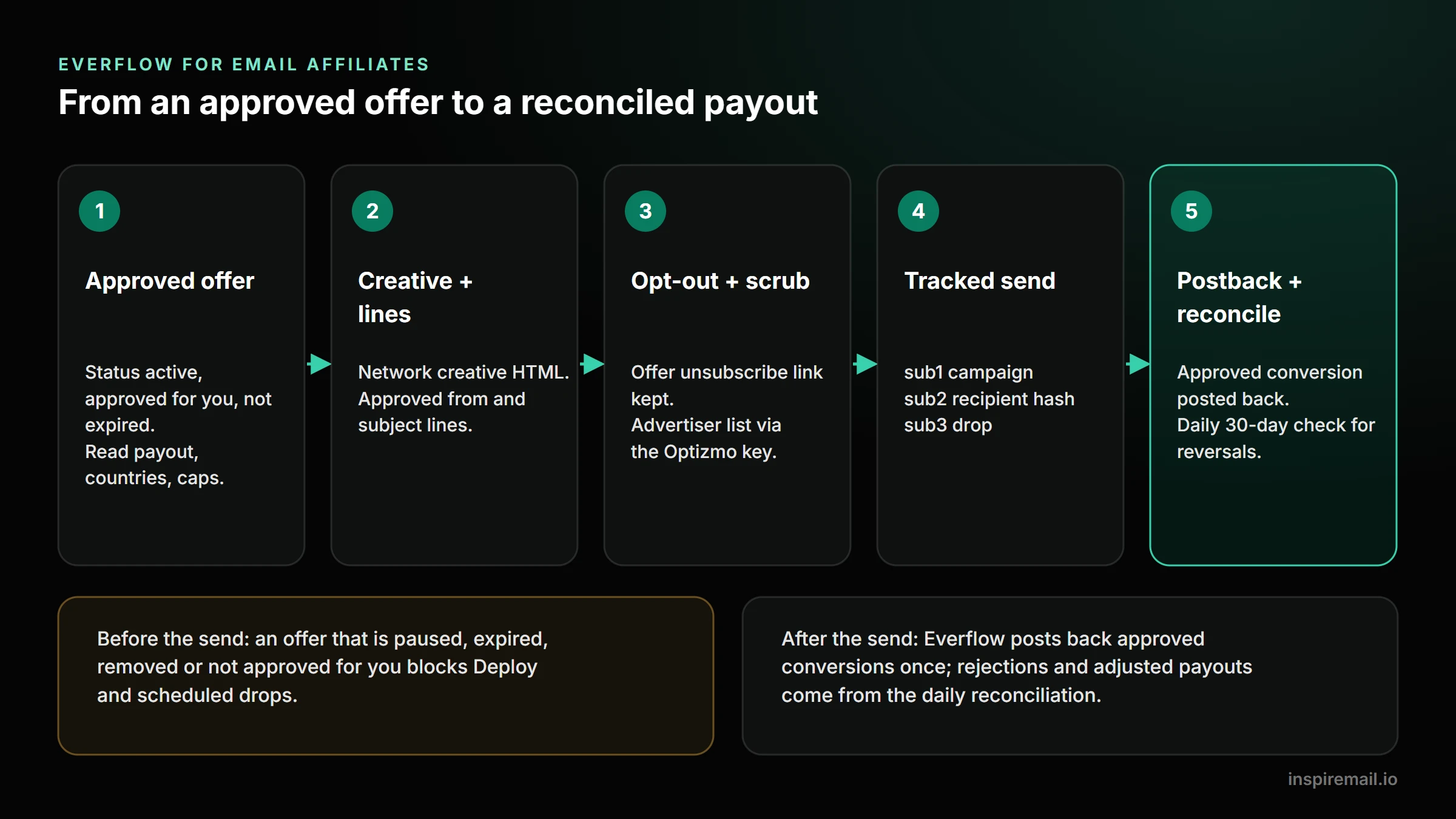
TL;DR: as an email affiliate on an Everflow network, your job runs in five steps. Pick an offer that is active, approved for you and accepts email in your countries. Mail it with the network's creative and approved from and subject lines. Keep the offer's unsubscribe link and scrub its suppression list before every drop. Send tracked links with sub IDs for the campaign, recipient and drop. Then let postbacks report conversions, and reconcile with Everflow's report for reversals. The Everflow integration guide covers the connection in Inspiremail; this article covers the workflow around it.
Everflow is a partner marketing platform that affiliate networks and advertisers run their programs on. As a publisher you work in its partner side: you see the offers you may run, your tracking links, your stats and your postbacks. A sub ID is a free-text parameter you add to your tracking link (sub1 to sub5) that Everflow stores with the click and sends back with the conversion.
Why email affiliates need a different routine
Everflow's partner documentation is written for every traffic type. Email adds rules that a social or search affiliate never meets: the advertiser's suppression file, approved subject lines, an unsubscribe link that belongs to the advertiser, and complaint rates that can get a whole network banned at Gmail. The FTC's CAN-SPAM guide explains why networks care: the advertiser whose product you promote can be held responsible for your mail.
 From an approved offer to a reconciled payout
Step 1: pick offers you may actually mail
Open the offer in your partner platform and read three things before anything else:
- Traffic and geography. Is email an allowed traffic type, and are your subscribers in the allowed countries? A conversion from a country the offer excludes is usually rejected: for example, a US-only insurance offer won't pay for a reader in Canada.
- Status and approval. Some offers need an application. An offer that is paused, has passed its end date or was never approved for you is dead weight in your planning.
- Caps and payout type. A daily cap tells you how much volume the offer can absorb. CPA, CPL and revenue-share offers behave differently in your reports.
The offer details come through the Affiliate API too, which is how tools like Inspiremail keep the list current. In Inspiremail, an offer that is paused, expired, removed or no longer approved for you blocks Deploy and scheduled drops, so a drop never goes out for an offer that can't pay.
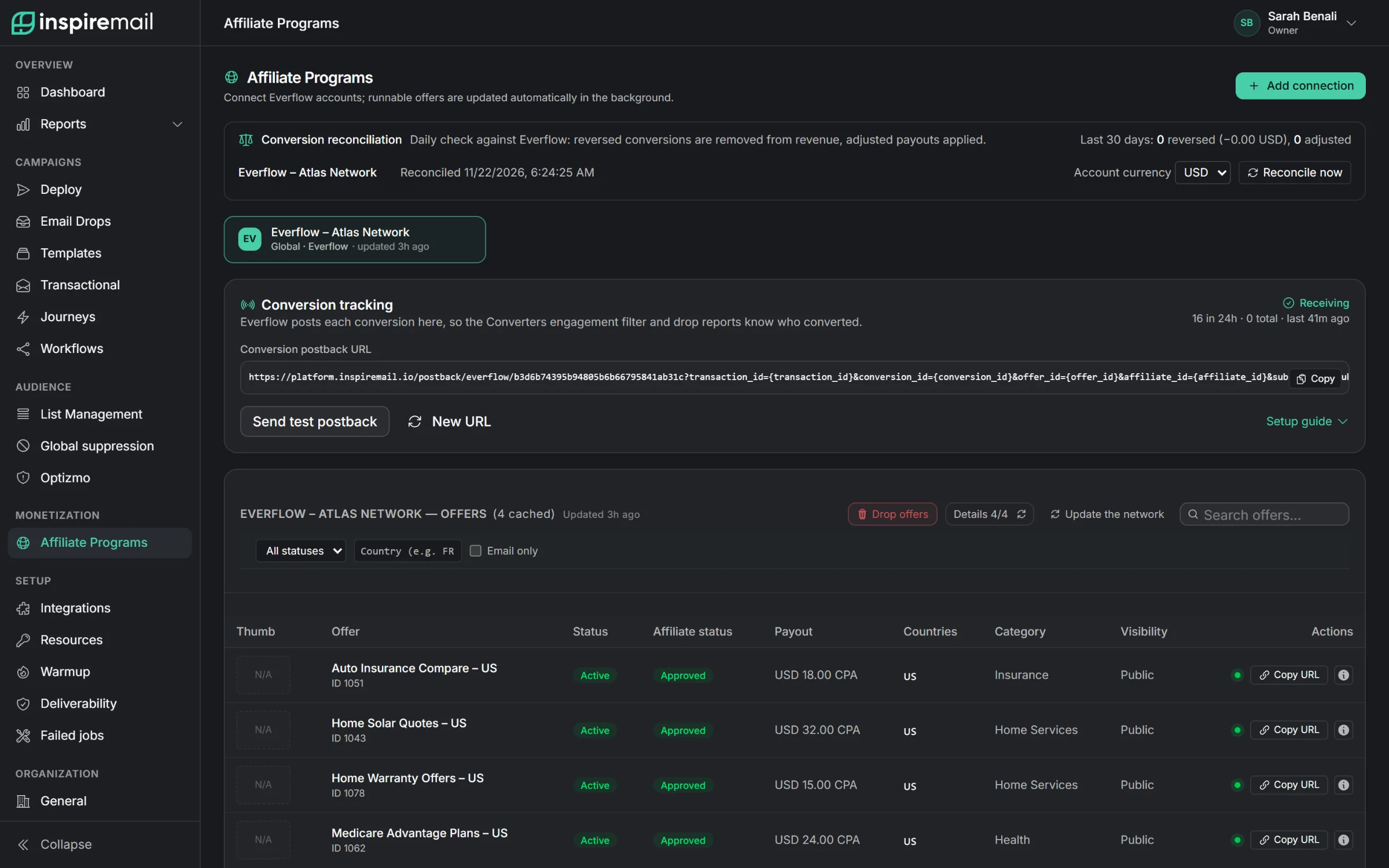
Synced Everflow offers with status, approval and payout (fictitious demo network).
Step 2: use the creative and the approved lines
Email offers usually come with HTML creatives and lists of approved from lines and subject lines. Use them. Networks check, and an advertiser who sees an unapproved claim in a subject line can reverse the conversions it produced.
Two habits help deliverability without breaking the rules:
- Clean the HTML. Network creatives are often built for many affiliates and carry heavy markup, remote images and long redirect chains. Keep the approved copy, but add a plain-text part and check every link. For instance, a creative that sends clicks through three trackers before the landing page is worth a question to your affiliate manager.
- Match the From name to your brand. The from line may be approved by the network, but the address and domain are yours. Readers complain about senders they don't recognize.
Step 3: honor the offer's opt-out and suppression
Each email offer normally carries two things in its email settings: the advertiser's unsubscribe link, which must stay in the email, and a suppression list, either as a file link or as an Optizmo Mailer Access Key. The list holds everyone who opted out of that advertiser's mail through any affiliate, and you remove them before every drop, not once a month.
How to scrub, how often, and how to keep proof is in how to scrub affiliate email lists with Optizmo. When the offer uses Optizmo, Inspiremail reads the key from the Everflow offer and downloads the list for you once the Optizmo integration is connected.
Step 4: pass sub IDs you can read later
Everflow lets you add sub1 to sub5 to your tracking link and returns them in the postback, as its parameters and macros guide describes. Decide on a scheme once and keep it:
| Sub ID | What to put in it | Why |
|---|---|---|
| sub1 | Campaign or creative | Compare creatives on the same offer |
| sub2 | A hash of the recipient, never the address | Credit the conversion to a contact without sharing personal data |
| sub3 | The drop | Revenue per drop, sender and list |
Inspiremail uses exactly this scheme: sub1 is the campaign, sub2 a 16-character hash of the recipient and sub3 the drop. Every link also runs on your branded tracking domain before it reaches the Everflow link, so your sending reputation isn't tied to a shared redirect host.
Step 5: postbacks, then reconciliation
A partner postback is the call Everflow makes to your URL when a conversion is approved. Everflow's postback guide for partners shows where to add it. The payout macro is {payout_amount}, and the click ID {transaction_id} is the key to de-duplicate on.
Two limits are worth knowing:
- No second postback. When a network later rejects or adjusts a conversion, the partner postback doesn't fire again. Your revenue stays inflated unless you pull the conversion report.
- Failures switch it off. Everflow treats any non-2xx answer as a failure; a postback that keeps failing can be deactivated, so your endpoint must answer 2xx for every accepted call.
Inspiremail runs a daily reconciliation over the last 30 days of the Everflow conversion report: rejected conversions come out of revenue and adjusted payouts are applied to the drop reports.
A pre-drop checklist for Everflow offers
- The offer is active, approved for you and allows email in your countries.
- You use the network's creative and an approved from and subject line.
- The offer's unsubscribe link is in the email, next to your own unsubscribe link and postal address.
- The suppression list was refreshed and applied for this drop.
- Links carry sub IDs and run on your tracking domain.
- A test postback reached your endpoint.
How we checked this guide
We tested each step in Inspiremail on 23 November 2026, in a demo organization with fictitious data, and compared it with the Everflow partner documentation and API reference linked above. For the wider picture, see the affiliate email marketing guide and the Everflow integration page. If something here no longer matches what you see, contact us and we'll correct it, as our editorial policy describes. Read more about us.
Frequently asked questions
Can I use my own subject lines on an Everflow offer?
Only if the network allows it. Many email offers list approved from and subject lines in Everflow, and the network may reject conversions from mail that used others. Ask your affiliate manager before testing your own.
Where do I find an offer's suppression list in Everflow?
On the offer's email settings: the network gives either a suppression file link or an Optizmo Mailer Access Key, plus the offer's own unsubscribe link. You download the list before each drop and keep the unsubscribe link in the email.
What should I put in sub1, sub2 and sub3?
Anything that tells you which mail produced a conversion, without personal data. A common scheme is campaign in sub1, a hash of the recipient in sub2 and the drop in sub3. Never put the email address itself in a sub ID.
Why are my Everflow numbers higher than my payout?
Partner postbacks fire when a conversion is approved, but networks can reject or adjust conversions later, and the postback does not fire again. Reconcile with Everflow's conversion report over the last 30 days to see the real figure.
Does Everflow send email for me?
No. Everflow tracks offers, clicks and conversions for the network. You send from your own sending accounts or MTA and bring your own list, suppression and deliverability.
- Everflow for email affiliates
- everflow
- affiliate offers
- sub ids
- postback