
Amazon SES bulk email: the operator's guide
Amazon SES bulk email for marketers: sandbox and production access, quotas per region, the bounce and complaint rates AWS acts on, dedicated IPs and costs.
· 6 min read · By Reda El Kasraoui
TL;DR: Amazon SES is a good engine for bulk marketing email if you treat it like an account you can lose. Get production access in each region you use and send within the 24-hour quota and maximum send rate. Keep hard bounces under 2% and complaints well under 0.1%: AWS reviews an account at 5% bounces or 0.1% complaints and may pause it at 10% or 0.5%, according to its sending review FAQ. Use a custom MAIL FROM domain so SPF aligns for DMARC, track bounces and complaints per region, and add dedicated IPs only when your volume is large and steady. Connecting SES to Inspiremail is a separate, ten-minute job covered in the Amazon SES setup guide.
Amazon SES (Simple Email Service) is AWS's sending service: you verify domains per region, send through its API or SMTP, and pay per message. A sending quota is the number of messages SES lets an account send in 24 hours in one region; the maximum send rate is how many it accepts per second. The sending review process is AWS's name for how it watches accounts and puts them under review or pauses them.
Sandbox first, then production access per region
Every new SES account starts in the sandbox in each region. AWS's production access page lists the limits: you can only mail verified addresses, at most 200 messages per 24 hours and 1 message per second.
The request for production access is where marketing senders get refused most often. What helps is answering, in plain words, the points AWS asks you to describe in the request:
- How you build the list. Your signup forms, double opt-in where you use it, and that you never buy or rent lists.
- How you handle bounces and complaints. Automatic suppression of hard bounces and complaints, and a stop rule for bad drops.
- How people unsubscribe. One-click unsubscribe in the headers and a link in every footer.
- What you send and how often. A real example and a realistic daily volume.
Production access is granted per region. If you plan to spread volume over US East and EU West, request it in both.
Quotas and send rate: plan drops around them
After production access, AWS sets a 24-hour quota and a maximum send rate per region and raises them as you send good mail; you can also request an increase. The sending quotas page notes that you may burst above the send rate briefly, not for sustained periods.
Three practical consequences for drops:
- A 500,000-email drop needs the quota. For example, if a region allows 200,000 per day, either split the drop over days, add a region, or wait for a higher quota.
- Rate limits are per region, not per identity. Ten verified domains in one region share one send rate.
- Throttling errors are normal at the limit. Back off and retry instead of failing the message.
Inspiremail reads each region's quota and send rate and paces drops below them, so you can combine identities from several regions and AWS accounts in one drop without tripping the limit.
The numbers AWS acts on
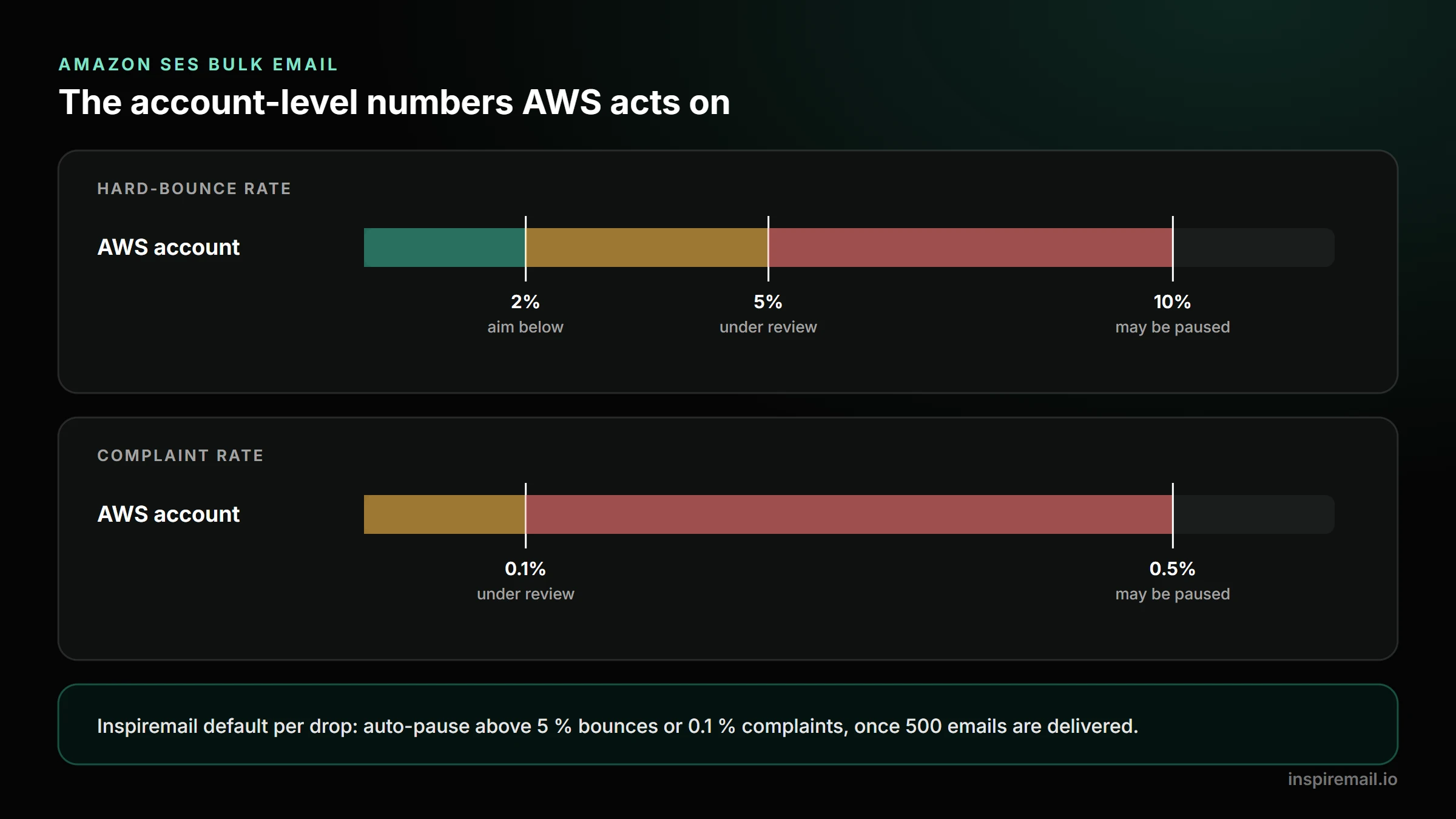 The account-level numbers AWS acts on
AWS publishes the thresholds in its sending review FAQ:
| Metric | Aim | Under review | Sending may be paused |
|---|---|---|---|
| Bounce rate (hard bounces) | below 2% | 5% or more | 10% or more |
| Complaint rate | below 0.1% | 0.1% or more | 0.5% or more |
Two details matter. The bounce rate counts only hard bounces to domains you haven't verified; "mailbox full" and IP blocks don't count. And the rates are calculated over a representative volume of your recent sending, so one bad drop on a small account moves them a lot.
The review is an account event, not a drop event. When it happens, AWS emails the account's root address and opens a support case; you fix the cause and reply with what you changed. Watch the rates in the reputation metrics and set CloudWatch alarms below the thresholds, so you hear about it before AWS writes to you.
Authentication and alignment on SES
- Easy DKIM signs with your domain once you publish the three CNAMEs SES gives you.
- Custom MAIL FROM. By default the envelope sender is an amazonses.com address, so SPF passes for Amazon's domain, not yours. A custom MAIL FROM domain such as
bounce.mail.example.commakes SPF align with your From domain for DMARC. - DMARC on the From domain is required for bulk senders at Gmail and Yahoo; see the bulk sender checklist and re-run an SPF, DKIM and DMARC check after DNS changes.
Shared or dedicated IPs
By default SES sends from shared IP pools whose reputation AWS manages. The dedicated IP page describes two options: standard dedicated IPs that you lease, warm and manage, and managed dedicated IPs, where SES allocates, warms and scales the pool for you.
| Shared (default) | Standard dedicated | Managed dedicated | |
|---|---|---|---|
| Reputation | Shared with other SES senders | Yours alone | Yours alone |
| Warmup | None | You warm each IP | SES warms the pool |
| Fits | Moderate or irregular volume | Large, steady volume, IP control | Large volume, less IP work |
A dedicated IP only helps when you send enough, every day, to keep it warm. Intermittent drops on a cold IP look worse than the same drops on a shared pool. Warm new IPs and domains gradually, over several weeks.
What it costs
SES is pay as you go. On 23 November 2026 the SES pricing page listed à la carte outbound email at $0.10 per 1,000 emails and standard dedicated IPs at $24.95 per IP per month, next to newer monthly plans with tiered per-1,000 rates. Check the page before you budget: AWS changed its plans in 2026.
Events: bounces and complaints, per region
SES reports deliveries, bounces and complaints through configuration sets and event destinations, usually SNS topics, set up in every region you send from. Without them, a complaint from a Gmail user never reaches your suppression list, and the next drop mails them again. The AWS guide to SNS notifications shows the manual route. SES also has an account-level suppression list; keep your own list as the source of truth, because it travels with you across regions and providers.
Inspiremail creates the configuration set, SNS topic and subscription in each enabled region when you connect the account, and suppresses hard bounces and complaints organization-wide.
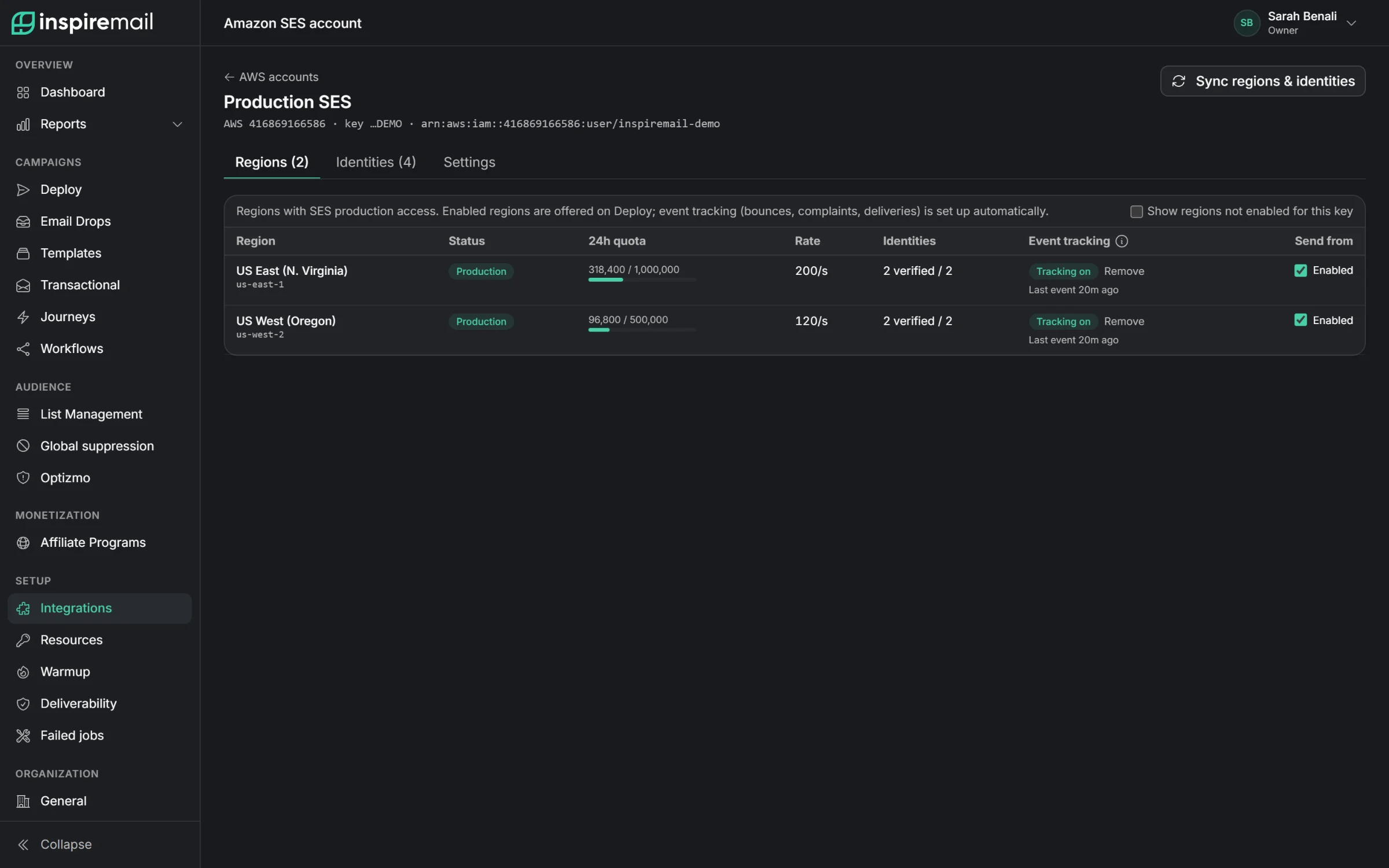
Quota, send rate and event tracking per SES region, read from AWS (fictitious demo account).
How we checked this guide
The limits, thresholds and prices come from the AWS pages linked above, read on 23 November 2026. We tested the Inspiremail behaviour on the same day in a demo organization with fictitious data. For connecting SES step by step, see the Amazon SES setup guide; for the full workflow around it, the affiliate email marketing guide and the Amazon SES integration page. If something here no longer matches, contact us and we'll correct it, as our editorial policy describes. Read more about us.
Frequently asked questions
Can I send marketing email with Amazon SES?
Yes. SES is built for both transactional and marketing mail, as long as you send to people who asked for it and follow the AWS acceptable use policy. AWS reviews accounts whose bounce or complaint rates suggest otherwise.
How many emails a day can Amazon SES send?
It depends on your quota, which is set per account and per region. In the sandbox it is 200 messages per 24 hours at 1 message per second. After production access, AWS sets a higher quota and raises it as you send good mail, or on request.
What bounce rate gets an SES account paused?
AWS recommends staying below 2%. At 5% it places the account under review, and at 10% it may pause sending. For complaints, review starts at 0.1% and a pause may follow at 0.5%.
Do I need a dedicated IP on Amazon SES?
Not at first. Shared IPs are fine for moderate, steady volume. Dedicated IPs make sense when you send large, consistent volume and want your reputation isolated; they need warming and add a monthly cost per IP.
Are SES quotas shared across regions?
No. Each region has its own sandbox status, quota and send rate. Many senders use two or three regions to add capacity, which also means requesting production access in each one.
- Amazon SES bulk email
- amazon ses
- sending quota
- dedicated ips
- ses reputation