
Transactional email API: keys, streams, first send
Set up the Inspiremail transactional email API: create a scoped API key, a stream with a verified sender, and send your first receipt with safe retries.
· 5 min read · By Reda El Kasraoui
TL;DR: create an API key under Settings › API keys with the messages:send scope, create a stream under Transactional › Streams with a verified sender identity, then call POST https://platform.inspiremail.io/v1/messages with Authorization: Bearer im_live_…, a from address on the stream's identity, a to, a subject and HTML or text. Add an Idempotency-Key header so retries never send twice. Every message gets a timeline in the log, and events can go to your own webhook.
Transactional email is mail a person triggers and expects, such as a receipt or a password reset. An idempotency key is a value you send with a request so that repeating the same request never repeats its effect.
Transactional email is the mail people expect: receipts, password resets, booking confirmations. It should never be held up by a marketing unsubscribe, and it should never go out twice because your server retried. Streams handle the first, idempotency keys the second.
Step 1: create a scoped key
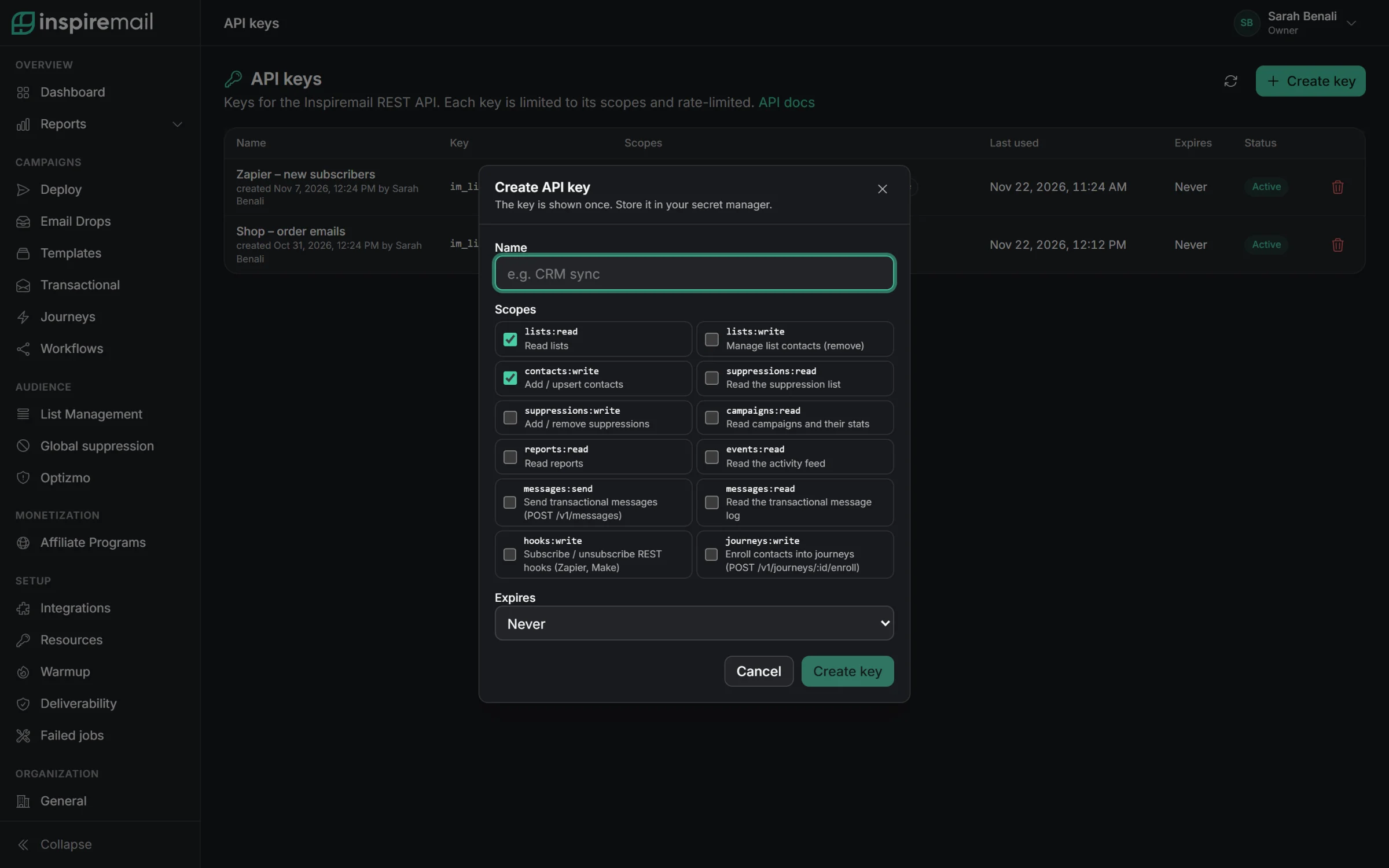
Settings › API keys. Each scope has a one-line description; tick only what the application needs.
- Open Settings › API keys and click Create key. Only the owner and Organization Managers can manage keys.
- Name it after the application ("Shop – order emails") so you know what breaks if you revoke it.
- Tick messages:send, plus messages:read if the app reads the log.
- Choose an expiry, or Never for a long-lived server key.
- Click Create key and copy the key straight into your secret manager. It starts with
im_live_and is shown once; only a hash is stored.
The list shows each key's prefix, scopes, last use and expiry. Revoking a key also disables any REST hooks it created.
Step 2: create a stream
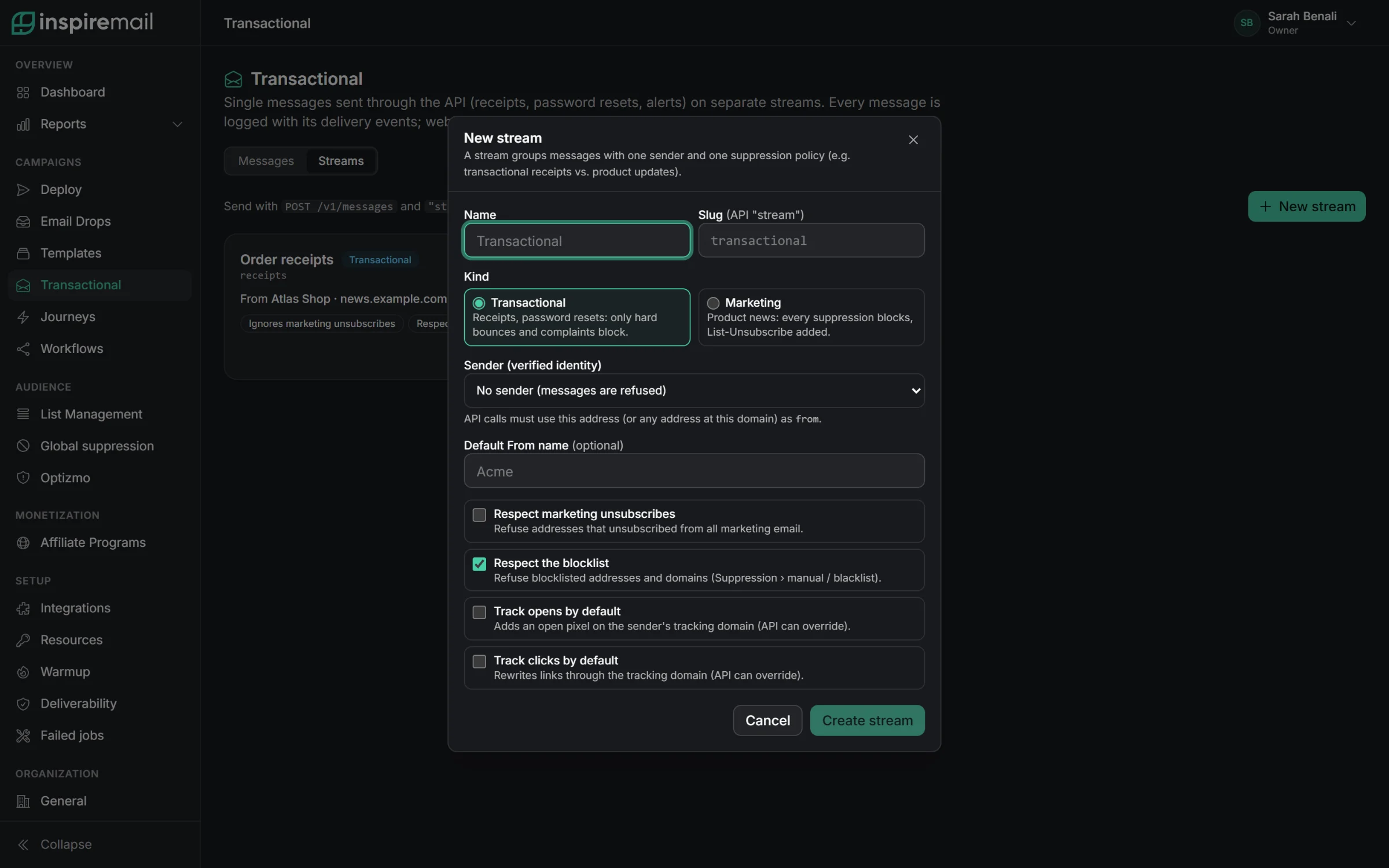
The New stream dialog. The slug is the value you pass as "stream" in API calls.
- Open Transactional › Streams and click New stream.
- Give it a Name and a Slug (for example
receipts). - Kind: Transactional for receipts and resets, Marketing for product news you send through the API.
- Sender: one verified identity of any connected provider. API calls must use this address, or any address at that domain, as
from. - Leave Respect the blocklist on. Turn on Respect marketing unsubscribes only if the stream carries mail people can reasonably opt out of.
- Tracking is off by default. Turn on opens or clicks if you need them; they run on the sender's tracking domain.
Step 3: send the first message
curl https://platform.inspiremail.io/v1/messages \
  -H "Authorization: Bearer $INSPIREMAIL_KEY" \
  -H "Content-Type: application/json" \
  -H "Idempotency-Key: order-10482-receipt" \
  -d '{
    "stream": "receipts",
    "from": "Atlas Shop <orders@news.example.com>",
    "to": { "email": "customer@example.net", "name": "Dana Reyes" },
    "subject": "Your order 10482",
    "html": "<p>Thanks, {{first_name}}. Your order is on its way.</p>",
    "variables": { "first_name": "Dana" }
  }'
Addresses are either a string ("Name <address>") or an object with email and name. A 201 means the provider accepted the message. The response carries the message ID; keep it if you want to look the message up later. You can also send a saved template with template_id and variables instead of inline HTML; variables are HTML-escaped. Other fields: reply_to (up to 5), custom headers (up to 20), tags, metadata, attachments and a tracking override.
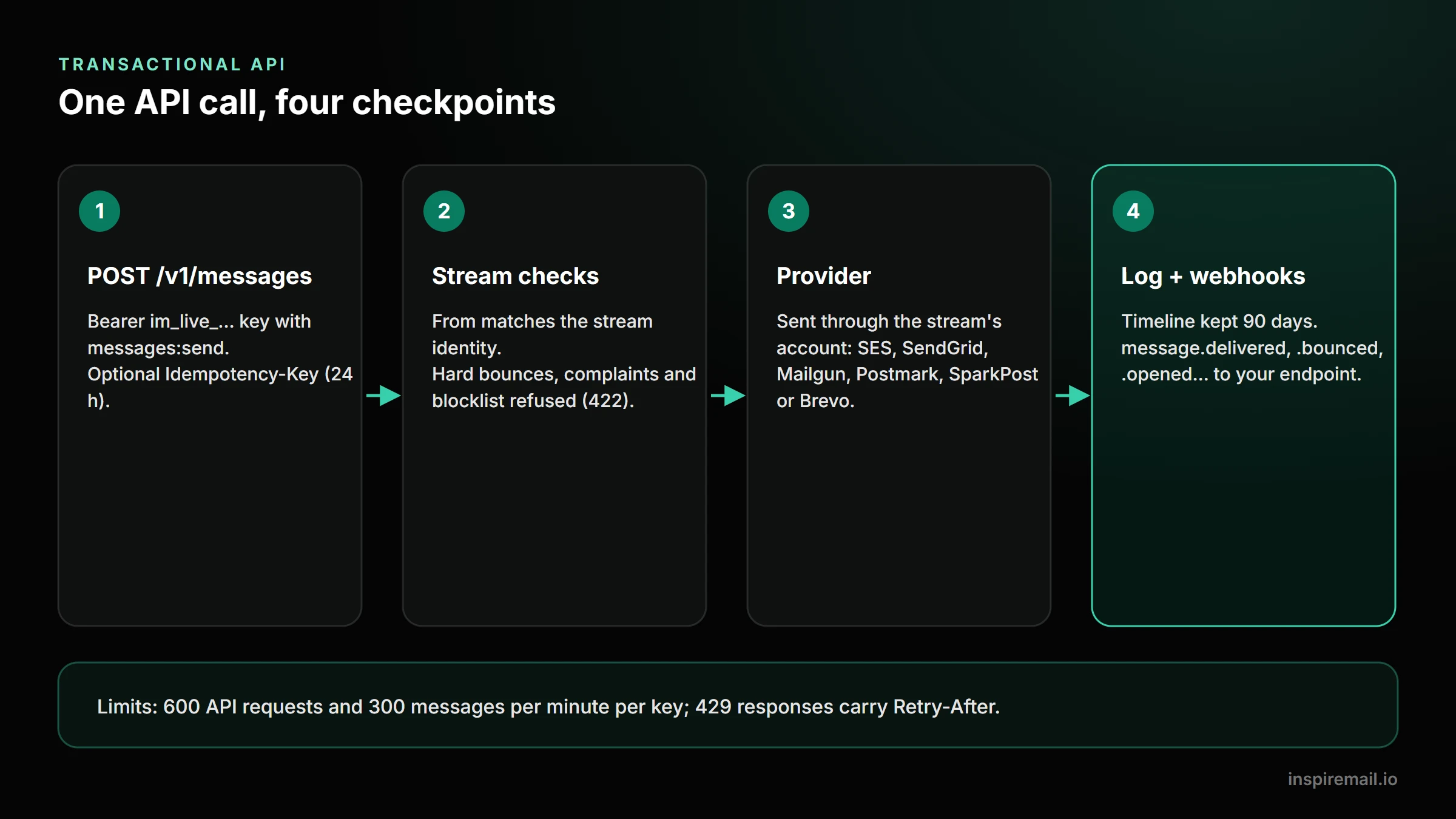 Four checkpoints between your call and the inbox.
Responses worth handling
| Status | Meaning | What to do |
|---|---|---|
| 201 | Sent: the provider accepted it | Store the message ID |
200 + Idempotent-Replayed | Same key and body as an earlier call | Nothing; it wasn't sent again |
| 409 | Same Idempotency-Key, different body | Use a new key for a new message |
| 422 | Recipient suppressed, from not on the stream identity, or attachments the provider can't take | Fix the request; don't retry blindly |
| 429 | Over the per-key limit | Wait for Retry-After |
| 502 | The provider refused the message | Logged as failed; check the detail |
A suppressed recipient is logged with the status suppressed, so support can see why a customer didn't get their receipt.
Transactional or marketing stream?
| Transactional stream | Marketing stream | |
|---|---|---|
| Typical mail | Receipts, password resets, alerts | Product news, announcements sent from your app |
| Refused recipients | Hard bounces and complaints, plus your blocklist unless you turn it off | Every suppression, including marketing unsubscribes |
| List-Unsubscribe header | Not added | Added automatically (a custom one is refused) |
| Opens and clicks | Off by default | Off by default, switch on per stream or per call |
The rule of thumb: if the recipient would be annoyed not to get it, it's transactional. If they could reasonably say "stop sending me these", it's marketing, and it should respect their unsubscribe. Mixing the two on one stream is how a password reset ends up blocked by a newsletter opt-out, or a promotion slips past one.
Recipient addresses in the log are masked and stored encrypted, so people looking at the Messages tab see enough to identify a message without the full address. Messages are kept for 90 days.
Watch what happens next
The Messages tab on the Transactional page lists every message with its status and a timeline of events. The same log is available through GET /v1/messages (filter by status, recipient, stream or date) and GET /v1/messages/{id}. To react in real time, subscribe an endpoint to message.delivered, message.bounced, message.complained and the other message.* events; the webhooks guide covers signatures and retries.
Why this is quick to adopt
You reuse the providers, verified identities and tracking domains you already set up for drops. There's no separate account to warm up and no second suppression list to keep in sync. The API description is published as OpenAPI 3.1 under Settings › API docs, so you can generate a client instead of writing one, and the OpenAPI specification tells your tooling how to read it.
How we checked this guide
We tested each step in a demo organization with fictitious data on 22 November 2026 and compared it with the provider documentation linked above, and with FIPS 198-1, the HMAC standard for the background on API security. Screens, button labels, limits and error messages are taken from the product as it works today. If something here no longer matches what you see, contact us and we'll correct it, as our editorial policy describes. Read more about us.
Related guides
Webhooks for events, Postmark if you send through a Postmark transactional stream, and the API & webhooks and developers pages. Background on the headers: the IETF's draft Idempotency-Key header and RFC 6585 for status 429.
Frequently asked questions
Which API key scope do I need to send transactional email?
messages:send to call POST /v1/messages, and messages:read if your code also reads the message log. Give each application its own key with only those scopes.
What is a stream?
A stream groups messages with one sender and one suppression policy. A transactional stream only refuses hard bounces, complaints and, by default, your blocklist. A marketing stream refuses every suppression and adds List-Unsubscribe headers.
How do I retry a send safely?
Send an Idempotency-Key header. For 24 hours, the same key with the same body returns the original response instead of sending again, and the same key with a different body is refused with HTTP 409.
What are the API limits?
600 requests per minute per key across the API, and 300 messages per minute per key on POST /v1/messages. Over the limit the API answers 429 with a Retry-After header.
How long are transactional messages kept?
90 days, with the recipient address masked and stored encrypted. Each message keeps its event timeline: sent, delivered, delayed, bounced, complained, opened and clicked.
Can I attach files?
Yes: up to 10 files, 5 MB each and 10 MB in total, sent base64-encoded. Executable files are refused.
- transactional email API
- api keys
- idempotency
- receipts
- developers