
Global suppression list: import, block, export
Import a global suppression list into Inspiremail: upload emails, domains or SHA-256 hashes, block whole domains and export the list as CSV for an audit.
· Last updated · 5 min read · By Reda El Kasraoui

TL;DR: open Global suppression and click Import. Upload a CSV or text file (UTF-8, one address, domain or SHA-256 hash per line, up to 2,000,000 lines or 100 MB). Imported entries are stored with the reason "Blacklist" and apply to every list, offer and provider in your organization from the next audience build. Use Add to blacklist for a few entries by hand, and Export CSV to take everything with you.
A global suppression list is the set of addresses and domains your organization never sends to, whatever the list, offer or provider. A hashed entry is an address stored as its SHA-256 digest instead of in clear text, so you can block someone without keeping their address.
You need this on day one if you're moving from another platform: the unsubscribes, bounces and complaints you collected there have to come with you. Mailing them again "because the new tool didn't know" is how sender reputations get burned in a week.
What's on the list already
Inspiremail fills the list on its own: hard bounces and complaints reported by any provider, unsubscribes from the unsubscribe page and the one-click header, and anything you add. The counters at the top split it by reason, and the table shows each entry's source and date.
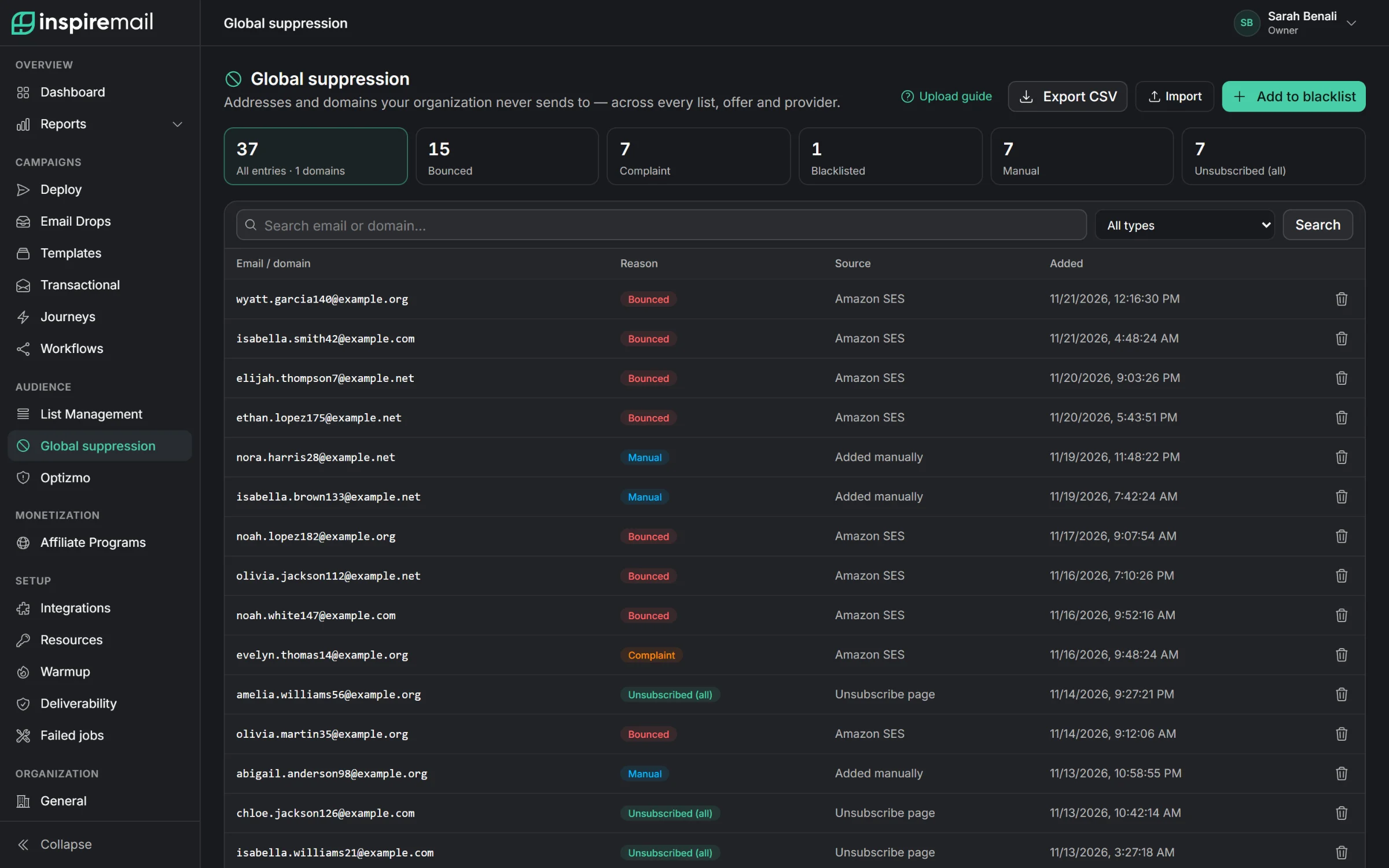
Global suppression with fictitious demo entries. Every reason has its own counter.
| Reason | Where it comes from |
|---|---|
| Bounced | A hard bounce reported by your provider |
| Complaint | A spam complaint (feedback loop) |
| Unsubscribed (all) | The recipient left everything you send |
| Manual | Added by a team member with Add to blacklist |
| Blacklisted | Imported from a file |
Step 1: prepare the file
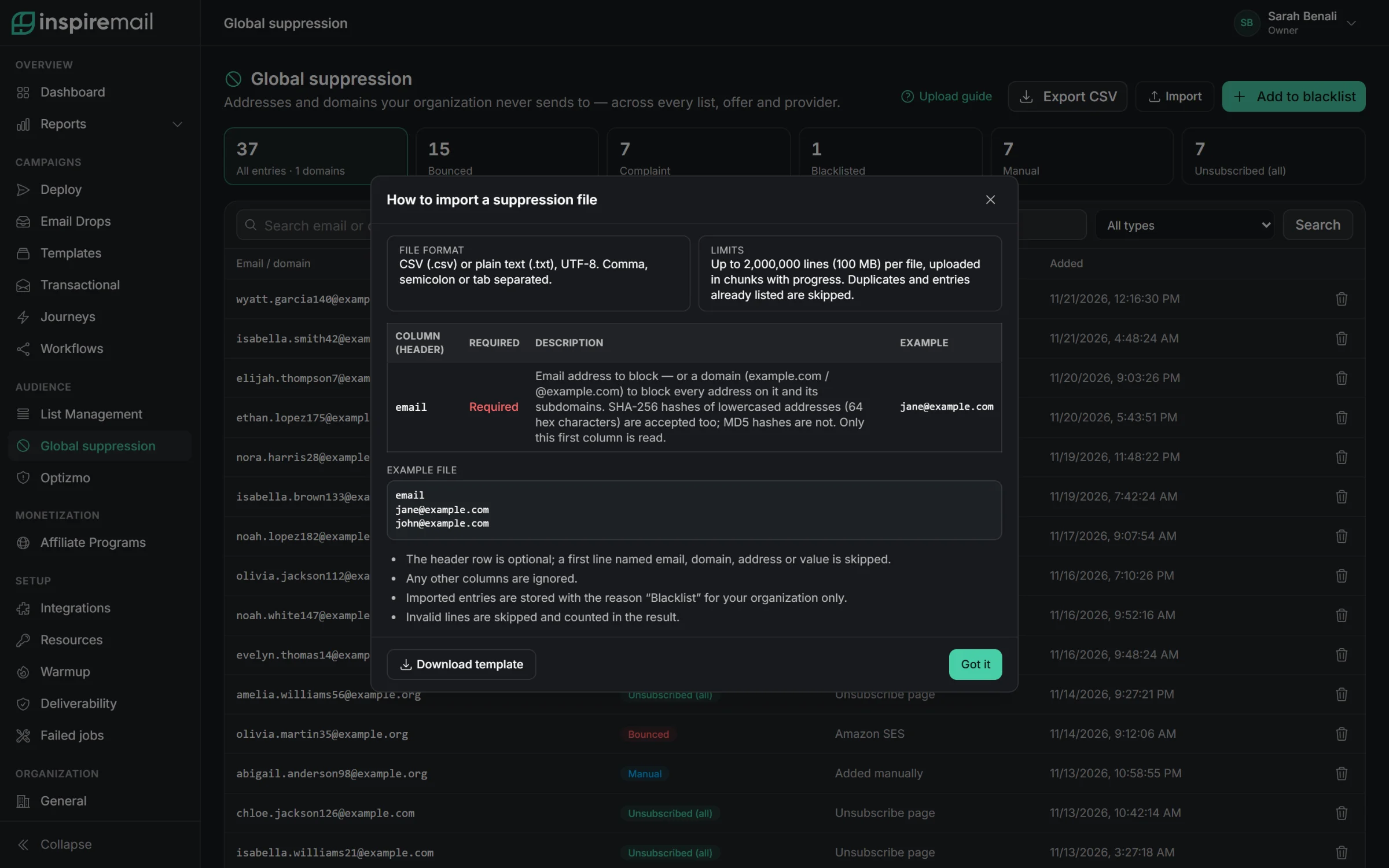
The Upload guide on the same page. Download template gives you a file with the right header.
- One entry per line, in the first column:
jane@example.com,example.comor@example.com, or a 64-character SHA-256 hash of a lowercased address. - A header is optional. A first line named
email,domain,addressorvalueis skipped. - Other columns are ignored, so an export from another platform with dates and reasons works as is.
- Lowercase before hashing. If you supply hashes, they must be SHA-256 of the trimmed, lowercased address, or they won't match. FIPS 180-4 defines SHA-256.
Exports from the big platforms are usually fine as they are. Mailchimp, for example, lets you export unsubscribed and cleaned contacts as CSV with the email in a column called "Email Address"; move that column first, or keep only it.
Step 2: import
- Open Global suppression and click Import.
- Choose the file. It's uploaded in chunks with a progress bar, so a two-million-line file doesn't time out.
- Read the result: entries added, entries already listed, invalid lines skipped, and MD5 hashes skipped.
Imported entries are stored with the reason Blacklist, for your organization only. Nothing is shared with other organizations.
Moving from another platform
Do the suppression import before you import any list. Then, when the lists arrive, every address that unsubscribed, bounced or complained with your old provider is already blocked, and nothing slips into the first drop. Export from the old platform every category it keeps (unsubscribed, cleaned or bounced, complained), import each file, and compare the counters with what the old platform reported.
Adding a few entries by hand
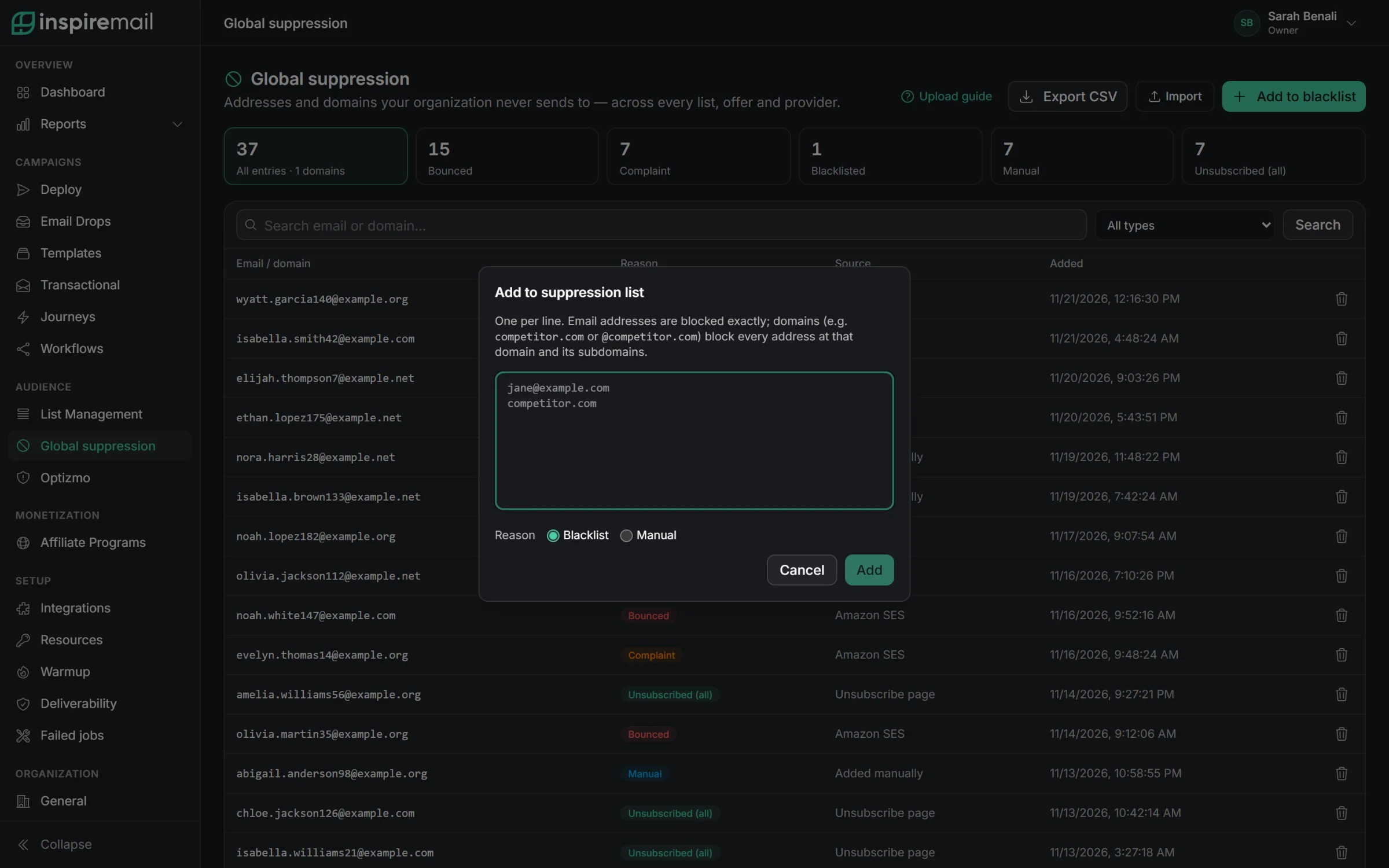
Add to blacklist: one entry per line. Domains block every address at the domain and its subdomains.
Add to blacklist takes one address or domain per line. Use it for a person who asked by phone, a competitor's domain (competitor.com) so their staff never land in a drop, or a spam trap you identified. Domains block every address at the domain and its subdomains.
How suppression is applied
Every audience build removes global suppression entries, on top of offer suppression lists, offer unsubscribes, bounces and complaints, and records how many contacts each rule removed. Sending checks again at send time, so an address suppressed while a long drop is running is skipped too. Transactional streams only refuse hard bounces, complaints and blocklist entries; the transactional email API guide explains why.
Export and removal
Export CSV downloads the list as a CSV file: useful for an audit, a data protection request, or moving on. Remove (the bin icon) takes one entry off after a confirmation, for example an address that bounced while a mailbox was full and the person has asked to be mailed again. Removing an unsubscribe should only ever happen at the recipient's own request.
Troubleshooting
- Many "invalid" lines: the address isn't in the first column, or the file isn't UTF-8. Re-save it as UTF-8 CSV and move the email column first.
- "MD5 hashes not supported": those are advertiser files. Use the Optizmo integration instead.
- A hash didn't block anyone: it was computed on a mixed-case or padded address. Lowercase and trim, then hash.
- File over 100 MB: split it, for example into files of one million lines, and import them one by one.
How we checked this guide
We tested each step in a demo organization with fictitious data on 22 November 2026 and compared it with the documentation linked above. Screens, button labels, limits and error messages are taken from the product as it works today. If something here no longer matches what you see, contact us and we'll correct it, as our editorial policy describes. Read more about us.
Related guides
Advertiser lists: Optizmo suppression scrubbing. Legal side: CAN-SPAM footer requirements; the FTC's CAN-SPAM guide requires you to honor opt-outs and never to sell or transfer the addresses of people who opted out. Feature overview: suppression and Optizmo.
Frequently asked questions
What file format does the suppression import accept?
A CSV or plain text file in UTF-8, comma, semicolon or tab separated, with the address, domain or hash in the first column. A header line named email, domain, address or value is skipped, and other columns are ignored.
How large can a suppression file be?
Up to 2,000,000 lines or 100 MB per file, uploaded in chunks with a progress bar. Split larger files and import them one after the other.
Can I import MD5 hashes?
No. SHA-256 hashes of lowercased addresses (64 hexadecimal characters) are accepted; MD5 hashes are counted and skipped. Advertiser MD5 files belong in the Optizmo integration, which handles them per offer.
Does a suppressed domain also block subdomains?
Yes. Adding example.com or @example.com blocks every address at that domain and at its subdomains, such as mail.example.com.
Who can manage the suppression list?
The owner, Organization Managers and List Managers. A List Manager can import, add, remove and export entries without access to drops or billing.
- global suppression list
- suppression import
- do not mail
- list hygiene
- integration guide