
Tracking domains explained: why your click links matter
What a custom tracking domain is, why shared click-tracking domains hurt deliverability, and how to set one up with a CNAME record and HTTPS, step by step.
· Last updated · 5 min read · By Reda El Kasraoui

TL;DR: a custom tracking domain is a subdomain you own, such as t.example.com, that your email platform uses for click redirects, the open pixel and unsubscribe pages. Spam filters check every link domain in a message, so a domain shared with other senders makes you inherit their reputation. Set one up per sending identity with a CNAME record and an HTTPS certificate.
A custom tracking domain is a hostname on your own domain that carries click and open tracking, instead of a domain shared with other senders. Link reputation is how spam filters rate the domains that appear in a message's links.
What a tracking domain does
In a tracked email, the links don't go straight to their destination. They go to a tracking domain, which records the click and sends the reader on. The same host usually serves the open pixel and the unsubscribe and preference pages too. Most senders never look at that host. Filters always do.
- When the email is prepared, each link such as
https://offer.example/landingis rewritten to a tracking URL likehttps://t.example.com/c/abc123. - When a reader clicks, the tracking server records the click and answers with a redirect to the original destination.
- A tiny image on the same host records an open when images load.
- The unsubscribe and preference links live on the same host, including the HTTPS URL in the one-click
List-Unsubscribeheader.
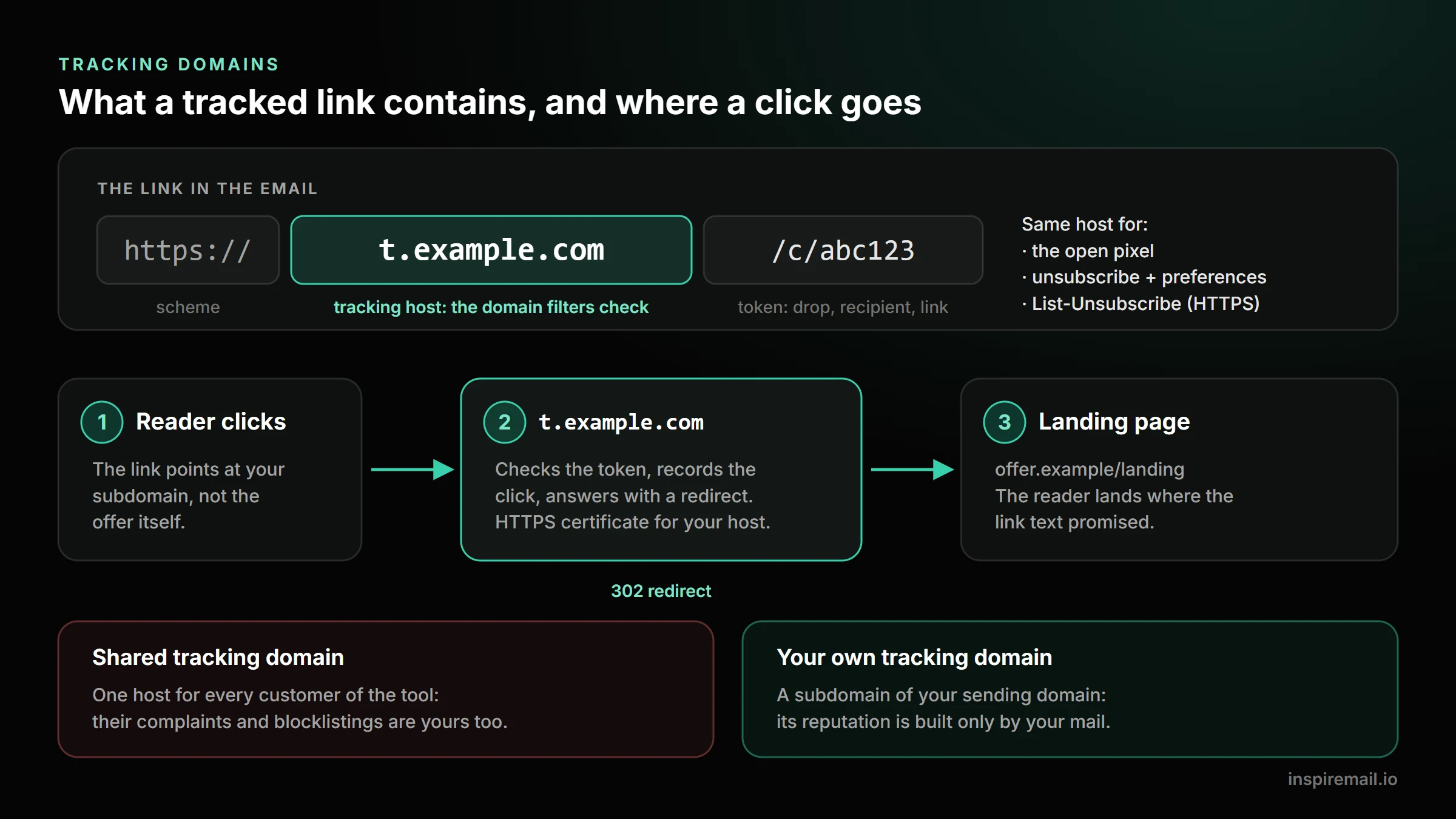 The host in the middle of the link is the part spam filters look up. The token after it only identifies the click.
Why link domains affect deliverability
Filters judge the links in a message, not just the sender. Twilio SendGrid's documentation on link branding says spam filters and inbox providers look at the links within email messages and use the reputation of the root domain to decide whether to trust them.
URI blocklists make this concrete. The Spamhaus Domain Blocklist is queried by software that extracts domains from email message bodies, and even has a listing code for abused redirector domains. SURBL lists domains used to filter messages based on links in the body, regardless of the sending IP. If a link domain is listed, your message is judged with it.
The problem with shared tracking domains
Plenty of email tools rewrite links to one domain shared by all their customers. It's convenient for the tool. For you, it causes three problems:
Shared tracking domain
- Reputation pooled with every customer of the tool
- One abusive sender can get it blocklisted for all
- Links point to a domain unrelated to your brand
Custom tracking domain
- Reputation built only by your own sending
- Isolated from other senders' mistakes
- Links match your From domain and brand
The brand mismatch matters to people too. A message from news@example.com full of links to an unrelated domain looks like phishing. Google's sender guidelines ask that links be visible and easy to understand, so recipients know what to expect when they click.
How to check which tracking domain you use today
Before changing anything, find out what your current emails actually contain:
- Send a campaign test to a personal mailbox and open it.
- Hover over a few links, or copy one, and look at the host between
https://and the next/. If it belongs to your email tool rather than to you, you are on a shared domain. - Open the raw message (in Gmail, Show original) and search for
List-Unsubscribe. The HTTPS URL in that header should use the same hostname as your links. - Check the image URLs in the HTML source. Images on the tool's domain add one more shared domain to every message.
If all four point to your own subdomain, you already have a custom tracking domain, and the rest of this article is a check that it's set up well.
How to set up a custom tracking domain
- Choose a hostname under your sending domain that has no existing records, for example
t.mail.example.comfor mail sent fromdeals@mail.example.com. - Create the CNAME that points the hostname at your platform's tracking endpoint. A CNAME can't coexist with other records at the same name, so check first and never overwrite a record in use.
- Get a certificate. The platform must issue and renew a TLS certificate for your hostname so every tracked link is HTTPS. Amazon SES, for example, lets you set an HTTPS policy for custom redirect domains.
- Verify. Send a test, click a link and confirm the browser shows your hostname with a valid certificate before the redirect.
- Repeat per sending identity, so each program carries its own link reputation.
Good practices
- One tracking host per sending identity. If one domain gets into trouble, the others aren't affected.
- Always HTTPS, with a certificate issued for your hostname and renewed automatically.
- Host images on your domain too. Images from a third-party host add yet another domain to the message.
- Warm up new domains. A new tracking domain has no history either; ramp volume gradually as described in our email warmup schedule guide.
- Monitor the domain. Re-check DNS and blocklist status regularly; records get deleted during unrelated DNS changes.
How Inspiremail does it
Each sending identity verified with your provider gets its own tracking hostname, suggested as t. plus the identity's domain. Inspiremail issues and renews the certificate for it (TLS 1.2 minimum, TLS 1.3 on), and the CNAME is added for you through the DNS account that holds the zone, whether that's Cloudflare DNS, Route 53, Name.com or Namecheap. The hostname is checked first, and existing records are never overwritten. The tracking domain setup guide shows each click.
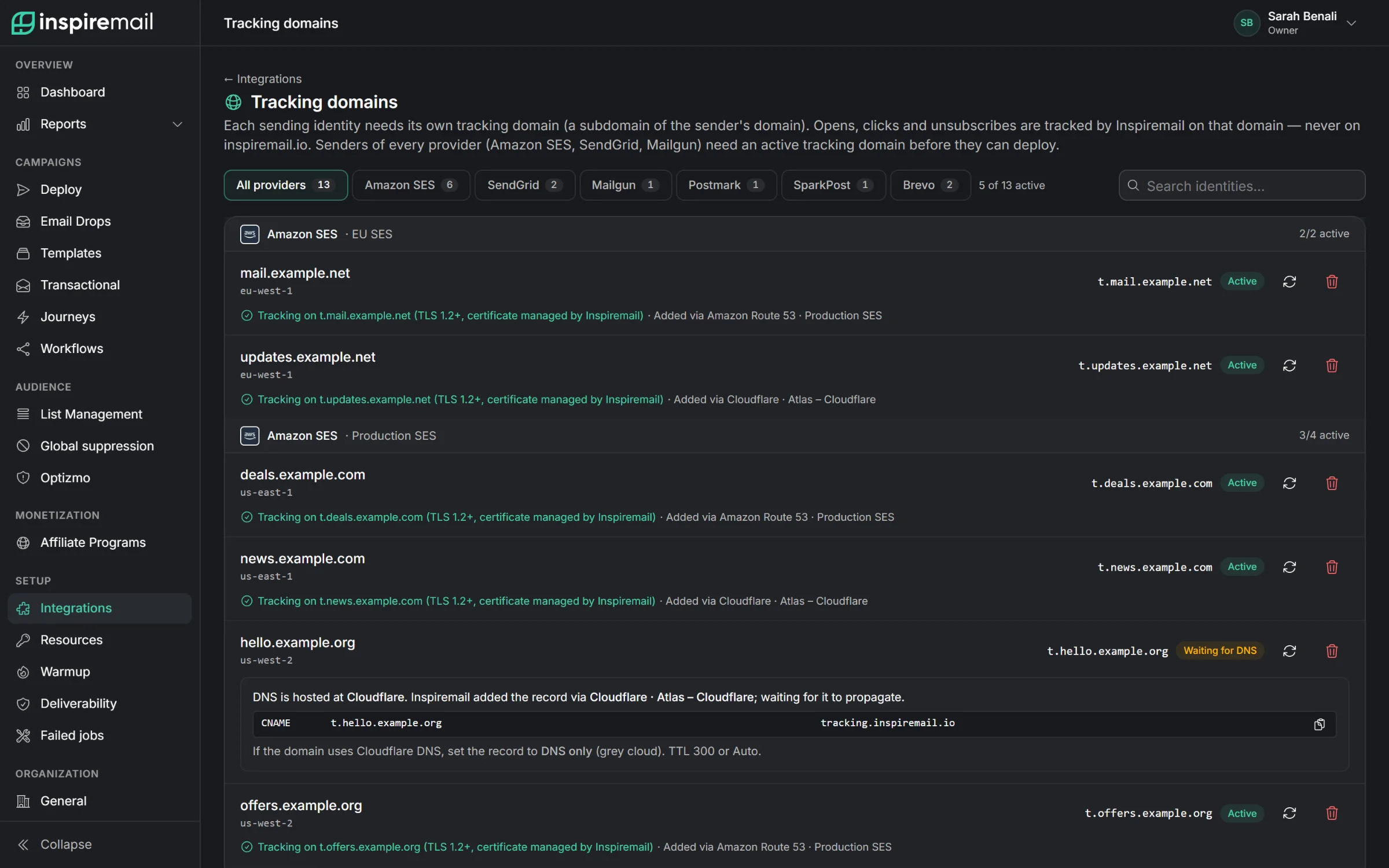
Integrations › Tracking domains with fictitious demo identities: one tracking hostname per sender.
Clicks, opens, unsubscribe and preference pages all run on your hostname, and creative images imported from your network are served from it too. Deploy won't send from an identity without an active tracking domain, and the link scan in the Deploy checklist flags redirects, shorteners, plain-HTTP links and mismatched link text before you send. Learn more about tracking domains in Inspiremail and the deliverability toolkit.
How we checked this article
We analyzed the primary sources linked above (laws, regulator guidance and mailbox provider documentation) on 22 November 2026 and checked every statement about Inspiremail against the product, and with NIST SP 800-177 Rev. 1, Trustworthy Email for the background on DNS and TLS. If something here no longer matches what you see, contact us and we'll correct it, as our editorial policy describes. Read more about us.
Frequently asked questions
What is a custom tracking domain?
It is a hostname on your own domain, such as t.example.com, that your email platform uses for click redirects, the open pixel and unsubscribe pages instead of a domain shared by all of its customers. You point it at the platform with a CNAME record.
Does a custom tracking domain improve deliverability?
It removes a risk you don't control. Spam filters check the domains of the links in a message against reputation data and URI blocklists, so a shared domain carries every other sender's behavior. Your own domain carries only yours.
Should the tracking domain match my From domain?
Use a subdomain of the same organizational domain where possible, for example deals@mail.example.com with t.mail.example.com. Matching domains look consistent to people and to filters.
Do tracking links need HTTPS?
Yes. Plain HTTP links trigger browser warnings and look suspicious to filters. The platform should issue and renew a TLS certificate for your tracking hostname automatically.
Can one tracking domain serve several sending domains?
It can, but one tracking hostname per sending identity is safer. If one domain runs into trouble, the links of your other programs are not affected.
Will adding a tracking CNAME break my existing DNS?
Not if you use a hostname that has no records yet. A CNAME cannot coexist with other records at the same name, so check the hostname first and never overwrite a record that is in use.
- custom tracking domain
- link branding
- click tracking
- cname
- deliverability