
Email authentication check: SPF, DKIM and DMARC
Run an email authentication check on every sending domain: read the score, fix SPF, DKIM and DMARC records in one click and get an alert when DNS regresses.
· 5 min read · By Reda El Kasraoui
TL;DR: open Setup › Deliverability and click Check all now. Every sending domain of every connected provider gets a score out of 100 and a grade, with one row per record: SPF, DKIM, DMARC, MX, BIMI, MTA-STS, TLS-RPT and, for Amazon SES, the custom MAIL FROM. Click a failing row to see the exact record to publish, or click Add automatically if the zone is in a connected DNS account. After that, domains are re-checked daily and you get an alert when something breaks.
SPF is the DNS record listing which servers may send for a domain. DKIM is a cryptographic signature on each message, checked against a public key in DNS. DMARC is the policy that tells receivers what to do when neither passes in alignment with the From domain.
Gmail, Yahoo and Outlook now reject or junk bulk mail that fails these checks. If you want the reasons and the thresholds, the bulk sender requirements article covers them. This guide is about the screen that tells you whether your own domains pass.
Step 1: run the check
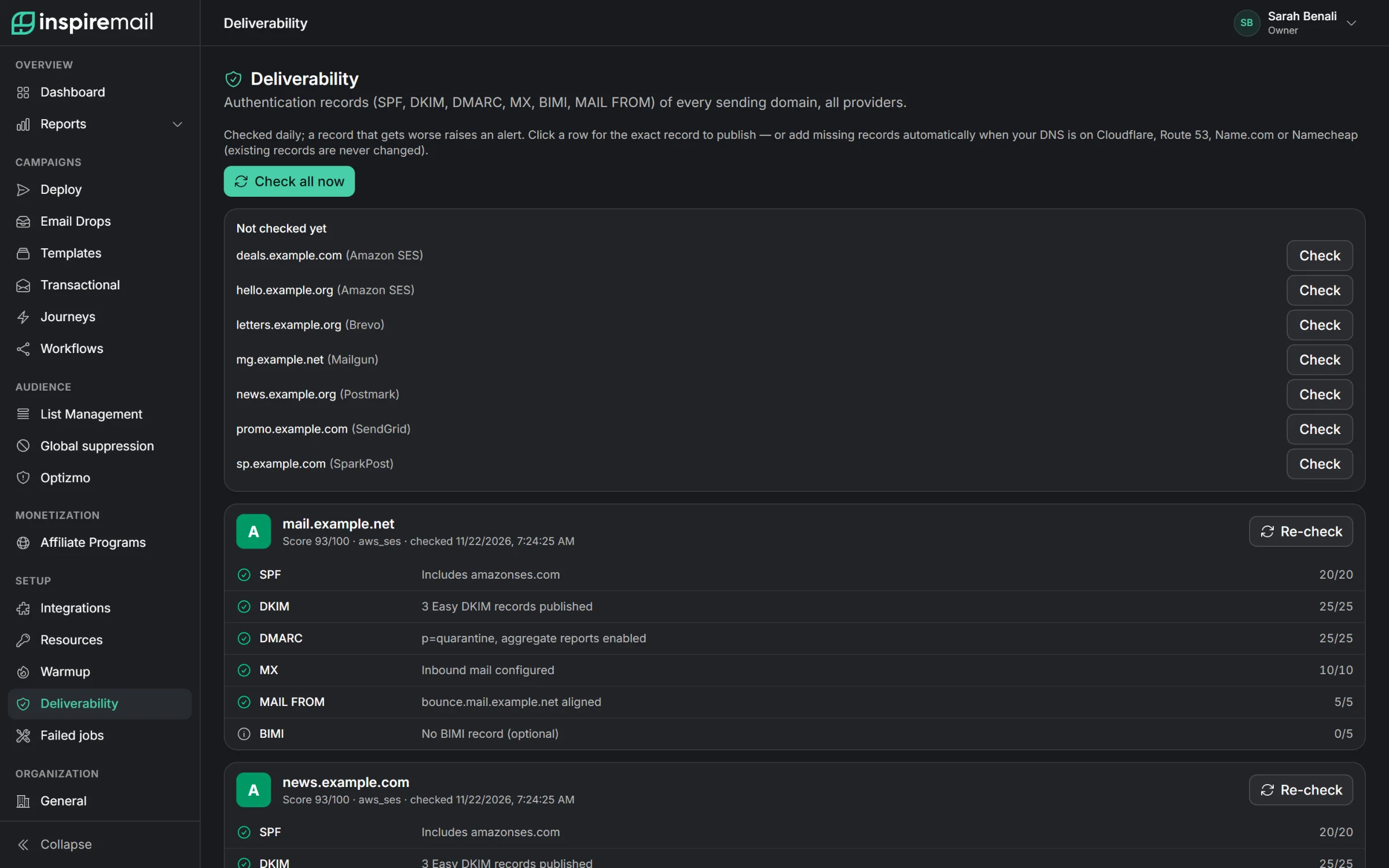
Setup › Deliverability with fictitious demo domains. Each card shows the score, the provider and the time of the last check.
- Open Setup › Deliverability. Domains appear as soon as a provider identity is verified; you don't add them by hand.
- Click Check all now, or Check next to one domain. The lookups go to public DNS, so you see what mailbox providers see.
- Read the card: grade, score, providers using the domain, then one row per record with the points it earned.
New domains show up under Not checked yet until their first check. Mailbox domains such as gmail.com and domains your provider manages for you are labelled as such and not scored, because you can't publish DNS there.
Step 2: read the score
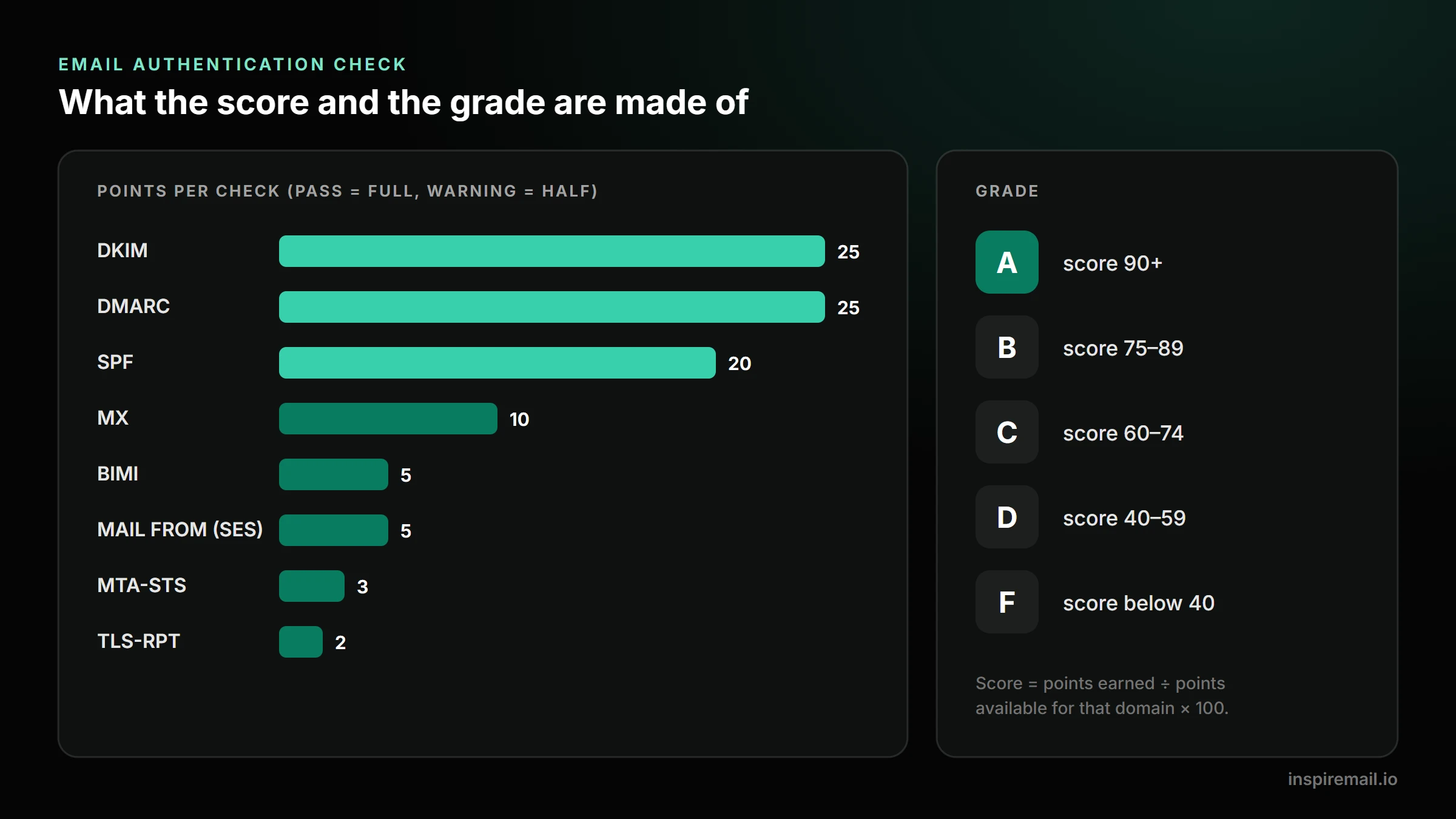 A pass earns full points and a warning half. The score is the share of the points that apply to that domain.
The weights follow what actually decides delivery. DKIM and DMARC carry the most because they're what Gmail and Yahoo check for alignment. MTA-STS and TLS-RPT are worth having but rarely the reason mail lands in spam, so they count for little. A DNS lookup that times out is marked unknown rather than failed, so a flaky resolver never sends you chasing a record that's fine.
What each row looks at:
- SPF: a single
v=spf1record that includes each provider sending from the domain, and stays within the 10 DNS lookups that RFC 7208 allows. Too many includes is a common failure after adding a second provider. - DKIM: the provider's selectors published and resolving (for SES, the three Easy DKIM CNAMEs).
- DMARC: a
v=DMARC1record, its policy, whether a subdomain inherits it from the parent, and whether SPF or DKIM can align. RFC 7489 defines the record. - MX: the domain can receive mail, which some receivers expect from a sender.
- MAIL FROM (Amazon SES): the custom bounce subdomain has its MX and SPF records, so SPF aligns.
- BIMI, MTA-STS, TLS-RPT: optional extras, reported so you know where you stand.
Step 3: fix what fails
Click a row to open its fix. You get the record type, host, value and TTL with copy buttons, and whether it's a new record or an edit of an existing one.
The DNS account used is recorded with the change, so later you can see which records Inspiremail added and through which account. Connecting the accounts takes a minute each; see the DNS automation guide.
A few fixes that come up again and again:
- DMARC missing. Start with
v=DMARC1; p=none; rua=mailto:dmarc@yourdomain.comso reports reach a mailbox you control, then move toquarantineonce the reports look clean. Google's DMARC rollout guide describes the same path. - Two SPF records. Receivers treat that as an error. Merge them into one record with both includes.
- SES without a custom MAIL FROM. Set one in the SES identity panel; Inspiremail can publish its MX and SPF records the same way.
Troubleshooting
- A domain is missing: it isn't verified at any connected provider yet. Verify it there; it appears here on its own.
- SPF shows too many lookups: each
include:can pull in further lookups. Remove includes for services you no longer use before adding a new one. - DKIM fails right after setup: DNS hasn't propagated. Click Re-check later rather than adding the records a second time.
Step 4: let it watch
You don't need to come back every week. Every domain is re-checked once a day. If a record gets worse than at the previous check, a DNS / deliverability regression alert goes to owners and managers in the organization's alert digest, with the domain and what changed. That's usually the first sign that someone edited the zone for an unrelated reason and took DKIM with it.
Why it's easier than a checker website
Public checkers look at one domain and one record at a time, and they don't know which providers you send through. This page already knows: it reads your connected accounts, expects the right SPF include and DKIM selectors for each one, checks SES MAIL FROM where it applies, and can publish the missing records for you. Then it keeps checking.
How we checked this guide
We tested each step in a demo organization with fictitious data on 22 November 2026 and compared it with the provider documentation linked above, and with NIST SP 800-177 Rev. 1, Trustworthy Email for the background on SPF, DKIM and DMARC. Screens, button labels, limits and error messages are taken from the product as it works today. If something here no longer matches what you see, contact us and we'll correct it, as our editorial policy describes. Read more about us.
Related guides
Give each identity a tracking domain before its first drop, and plan a warmup for new domains. Feature overview: deliverability toolkit and our deliverability page.
Frequently asked questions
Which domains does the check cover?
Every sending domain of every connected provider: Amazon SES identities and the domains of your SendGrid, Mailgun, Postmark, SparkPost and Brevo accounts, deduplicated. A domain used by two providers is checked once with both providers' requirements.
How often are domains re-checked?
Once a day automatically, and whenever you click Check all now or Re-check on a domain. When a record gets worse than the last check, owners and managers receive a DNS regression alert.
Will Inspiremail change my existing DNS records?
No. Add automatically only creates a record that is missing, and only when the zone is in a connected Cloudflare DNS, Route 53, Name.com or Namecheap account. A record that needs editing is shown as an update for you to make.
Why does my SES domain show no SPF requirement on the From domain?
Amazon SES checks SPF on the MAIL FROM domain, not on the From domain. Set a custom MAIL FROM such as bounce.yourdomain.com so SPF can align; the check then verifies its MX and SPF records.
Does a grade A mean my email reaches the inbox?
No. The grade only covers DNS authentication. Inbox placement also depends on consent, complaint rates, bounce handling and sending patterns.
Do I need BIMI?
No. BIMI is optional and only worth adding once DMARC is enforced at quarantine or reject for all mail. The check reports it but a missing BIMI record costs only 5 points.
- email authentication check
- spf
- dkim
- dmarc
- deliverability